Access Fileserver
To access our file server from outside, you have to log in to the University-VPN first using your university userID.
You can find instructions to the University-VPN on the ZDV website.
To access the fileserver from the Hertie-Network or Forschungsnetz start here.
#Connect to our fileserver
From outside you have to use the fully qualified name of our server. In the address field of windows explorer type:
\\neurologie.uni-tuebingen.de\hih-storage Or specify the drive for home or working group:
\\neurologie.uni-tuebingen.de\hih-storage\homes \\neurologie.uni-tuebingen.de\hih-storage\groups To login you need your HIH account with the domain name in prefix.
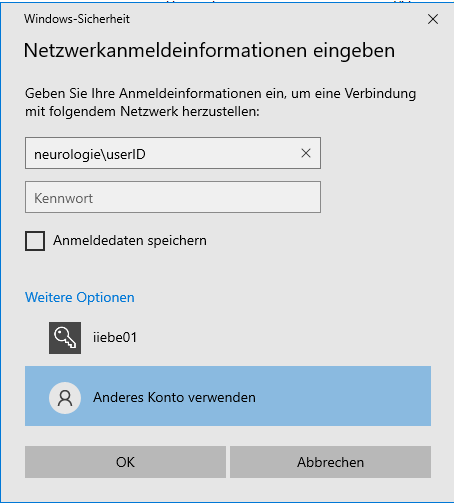
Klick: "Use other account" , "Anderes Konto verwenden"
neurologie\userID
(example: neurologie\exampleusr)
The top folder of the file system appears.
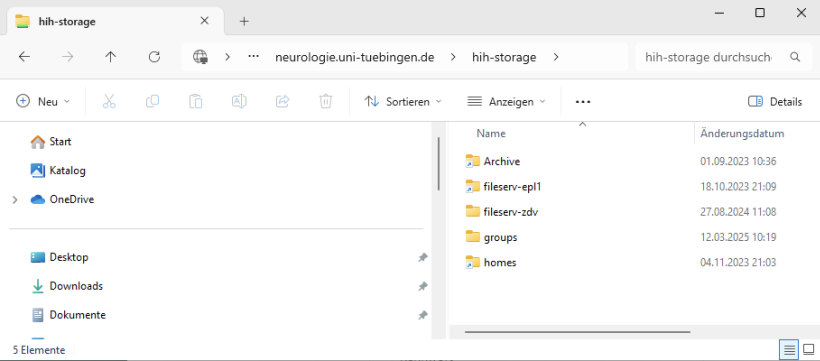
The home directory is located at: \homes\(your)Department\userID.
Example:
\\neurologie.uni-tuebingen.de\hih-storage\homes\Neurodegenerative_Diseases\exampleusrYour working group's directory is located in the groups folder, sorted by department.